
How to Cancel an OnlyFans Subscription in 2026: Full Steps
To cancel an OnlyFans subscription in 2026, log in at onlyfans.com, open your Following page or the creator's profile, find the creator, and switch off auto renew or unsubscribe. Your access continues to the end of the current paid period. OnlyFans does not refund unused subscription time. To stop future subscription renewals, turn off auto renewal for each creator you no longer want to subscribe to.
How to cancel an OnlyFans subscription in 2026: log in to onlyfans.com, open your Following page or the creator's profile, find the creator you subscribe to, and switch off Auto Renewal or unsubscribe. The cancellation prevents the next rebill but keeps your access live until the current period ends. OnlyFans operates a strict no-refund policy. Turn off auto renewal for each creator you no longer want to pay.
This is a different action from deleting your whole OnlyFans account. Cancelling here affects one creator's sub at a time and leaves the rest of your account intact. For the full account-deletion flow, see our complete OnlyFans account deletion guide.
What will you learn in this guide?
The terminology trap that makes cancel, unsubscribe, and delete sound interchangeable when they are not
The cancellation path on desktop and mobile, based on OnlyFans' own Help Center
Why does your access stay live for days or weeks after you click cancel?
The refund rule and the Terms of Service exception described in OnlyFans' Help Center
How to work through many active subscriptions one at a time
How to check that your cancellation took effect
What OnlyFans says, and does not say, about what creators see
Common cancellation problems and the resolution path for each
The Three Things "Cancel" can mean on OnlyFans
On OnlyFans, cancel, unsubscribe, and delete are not the same. Getting the terminology right saves the most common subscriber confusion: paying for content you thought you had stopped paying for.
OnlyFans' Help Center covers cancelling a subscription and deleting your account in separate articles.
1. Cancel auto-renewal
This is what almost everyone means when they say "cancel my OnlyFans subscription". It turns off the recurring rebill on a specific creator's subscription.
Your access to that creator's content continues until the current paid period expires. You do not get a refund for unused time, but you do not lose immediate access either. This is the action covered in the steps below.
2. Block the Creator
OnlyFans' Help Center says subscriptions renew automatically unless Auto Renewal is off, the subscription is a free trial, payment is declined or the subscription price increases. That article does not explain whether blocking a creator affects renewal.
To stop future subscription renewals, follow OnlyFans' cancellation guidance rather than relying on blocking.
3. Delete your Whole OnlyFans Account
Deleting your account ends your access to all your active subscriptions in one action, and OnlyFans says a deleted account cannot be restored. This is the right move only if you are leaving the platform entirely.
For the step-by-step flow on deletion, see our complete OnlyFans account deletion guide. For just cancelling one creator's sub, do not delete the account.
Cancel vs Block vs Delete: The Three Actions Side by Side
Use this table when you are not sure which action solves your specific problem. The wrong choice is usually blocking when cancellation was needed, or cancelling when deletion was needed.
Action | What it does | Effect on billing | Your access | Reversible |
Cancel auto-renew | Stops the next rebill on one specific creator's subscription | No new charges from that creator after the current period ends | Stays live to the end of the paid period | Yes, turn auto renew back on before the period expires |
Block the creator | Hides the creator's content from your feed immediately | Not described in OnlyFans' public pages. Cancel the subscription if billing is the concern | Lost for the blocked creator only; the rest of the platform is unaffected | Not confirmed in OnlyFans' Help Center |
Delete the account | Wipes your whole OnlyFans account, including all active subscriptions | No further subscription charges | Lost across the entire platform | No, deletion is permanent |
OnlyFans' Help Center describes cancelling as unsubscribing or turning off auto renewal. If your goal is to stop future subscription renewals, use that cancellation process rather than relying on a block.
How to cancel an OnlyFans subscription on Desktop?
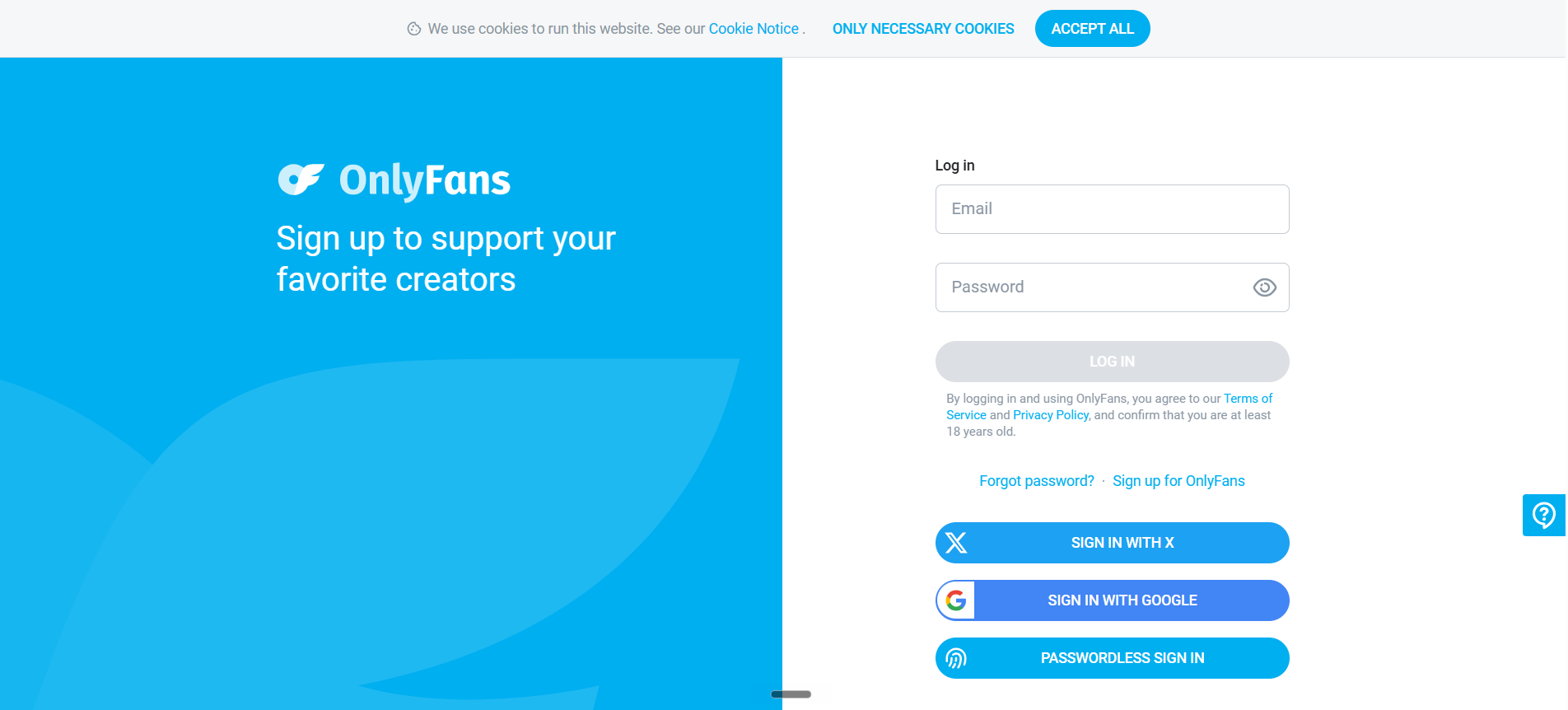
Our May 2026 screenshots show the login page and a signed in account menu, including Subscriptions. The interface may have changed since. For OnlyFans' own wording, see the "How do I cancel a subscription?" article in its Help Center and the subscription cancellation provisions in its Terms of Service.
Open a browser and sign in to onlyfans.com.
Open your Following page. OnlyFans says it lists all of your active and inactive subscriptions. If you cannot find it, look for the Subscription or Following section in your account menu.
Find the creator whose subscription you want to stop.
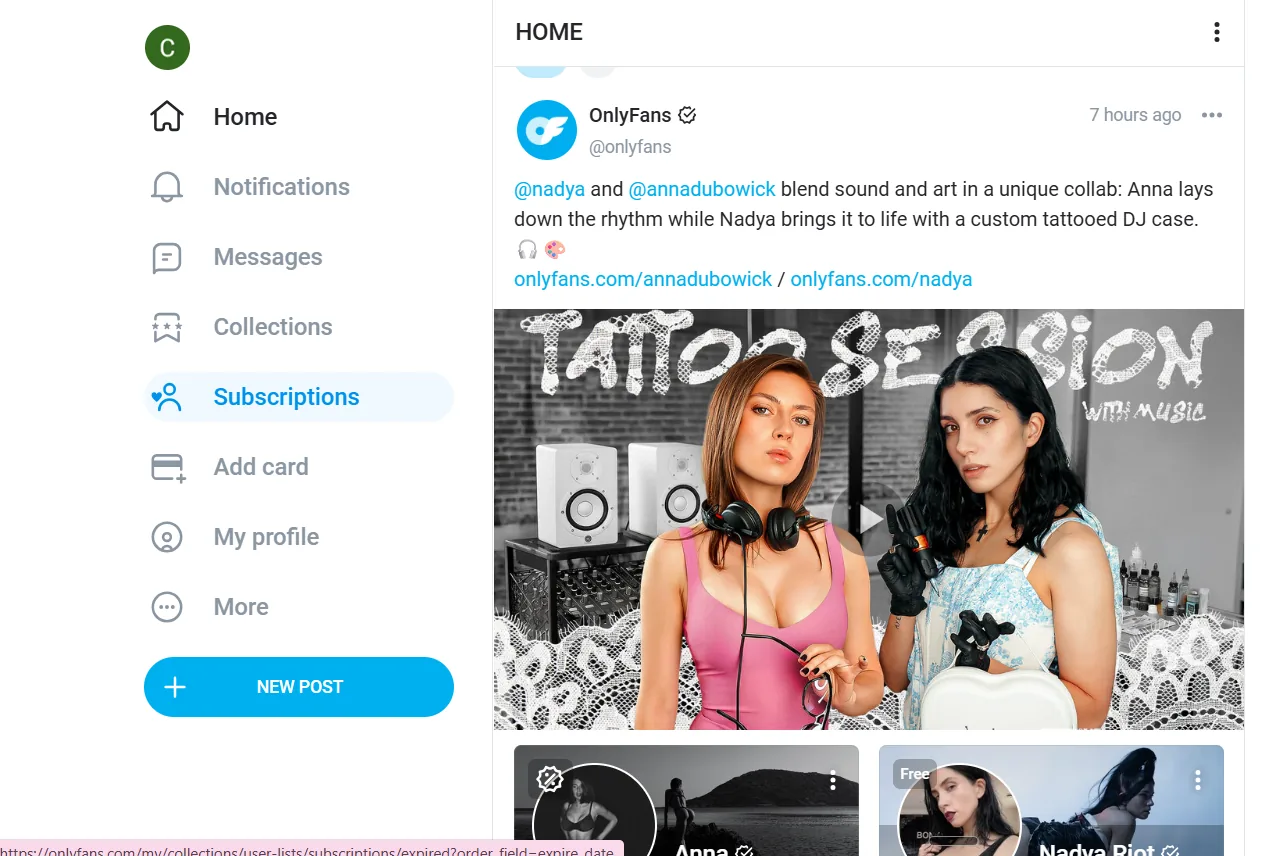
Switch off the Auto Renewal feature for that creator, or click to unsubscribe, which is how OnlyFans' Help Center words it.
If OnlyFans asks you to confirm, confirm the change.
Under OnlyFans' Terms of Service, cancelling stops that subscription from renewing. You keep subscription access until the current period ends.
The Alternative Path from the Creator's Profile
You can also cancel directly from a creator's profile page.
Open the creator's profile.
Look for the subscription or Auto Renewal option on their profile.
Switch Auto Renewal off, or unsubscribe.
Both paths produce the same result.
Some subscribers find the profile-page path faster when they only need to cancel one specific creator they happened to be viewing.
How to cancel an OnlyFans subscription on mobile?
OnlyFans has no official iOS or Android app. The platform is browser-only. Use Safari on iPhone or Chrome on Android. Any app called "OnlyFans" in the App Store or Play Store is unofficial and not endorsed by the company.
Open the browser, go to onlyfans.com, and sign in.
Open your Following page. If you cannot find it, look for the Subscription or Following section in the menu.
Find the creator you want to stop paying.
Switch off Auto Renewal for that creator, or tap to unsubscribe.
If OnlyFans asks you to confirm, tap to confirm.
Once you have followed the steps above, check that the subscription is no longer set to renew.
If nothing seems to change, reload the page and check again.
What Happens After you click Cancel?
Cancelling is not the same as being instantly disconnected. Six things happen, some immediately, some only at the end of the paid period.
1. Your access continues to the end of the period
If you cancel on day 15 of a 30-day subscription, you keep access for the remaining 15 days. The same logic applies to 3-month, 6-month, and 12-month bundles. Whatever you paid for, you get to use it to the end. Cancellation only stops the next rebill.
2. You do not get a refund
OnlyFans operates a strict no-refund policy on subscriptions. Per the OnlyFans Terms of Service, cancellation does not entitle the subscriber to a partial refund for unused time. This applies to all subscription lengths and all subscription tiers. OnlyFans' Help Center says subscriptions are not refundable unless there has been a violation of its Terms of Service.
3. What OnlyFans says about notifying the creator
OnlyFans' Help Center and Terms of Service do not confirm whether creators are notified when a fan turns off auto renew. Do not assume the change is hidden from the creator.
Your subscription stays active until the paid period ends, so you remain a subscriber until then.
4. You can reactivate before the period ends
If you change your mind, return to your Following page or the creator's profile before the period expires and turn Auto Renewal back on. The subscription then renews at the end of the current period.
After the period has expired, subscribing again starts a new paid subscription.
5. Bundled discounts cannot be partially refunded
If you bought a 12-month bundle at a 30 per cent discount, cancellation after month 1 still gives you 11 more months of access. You cannot recover the unused 11 months as a refund.
The platform offers bundles precisely because the subscriber commits to the full term up front.
6. Free trials and discounted subscriptions renew differently
OnlyFans says free trial subscriptions do not auto renew, though you can choose to renew at the subscription price. Discounted subscriptions are different. Once the promotional period ends, they renew at the full subscription price unless you have turned off auto renewal.
If a discounted subscription renews at the full price, OnlyFans says that payment is not refundable unless there has been a violation of its Terms of Service.
How to cancel multiple OnlyFans subscriptions at once?
OnlyFans' Help Center only describes cancelling subscriptions one at a time from your Following page and does not mention a bulk cancel option.
The realistic pattern subscribers should follow:
Open your Following page and look at the full list of active and inactive subscriptions.
Start with the subscriptions that renew soonest.
Turn off auto renew, or unsubscribe, for each one in turn.
After working through the list, reload the page and check that none of them is still set to renew.
Removing a Saved Card
OnlyFans' Help Center says your Wallet balance can be used for subscription renewals if you turn that option on. Check each subscription's renewal setting rather than relying on changes to your saved payment cards.
Sign in to onlyfans.com.
Open the Your Cards section of your profile, or look for the payment cards section in your account settings.
If your account offers a card removal option, use it for cards you no longer want saved. Cancel unwanted subscriptions separately.
Confirm if asked.
OnlyFans says Wallet funds can be used to subscribe, send tips or unlock paid messages without making a card transaction for every purchase.
For subscribers who are just doing housekeeping on a few subs and still want to tip occasionally, leave the card in place and rely on turning off auto renew for each subscription.
How to verify your OnlyFans Cancellation actually worked?
A quick check after cancelling helps you catch a change that did not go through before the next renewal date.
1. Immediate verification
Reload your Following page or the creator's profile after turning off auto renew, and check that the subscription is no longer set to renew.
If the subscription still appears to be set to renew, do not assume cancellation succeeded. Check again and contact support@onlyfans.com if you cannot confirm its status.
2. Keep your own record
OnlyFans' public Help Center does not promise a confirmation email when you cancel a subscription, so take a screenshot or note the date and time you turned off auto renew.
That record is useful if you ever need to contact support about a charge.
3. Check again before the renewal date
Before the next renewal date, return to your Following page and confirm that each cancelled subscription is still set not to renew.
Use this second check to see whether the subscription is still set to renew. Contact support if you cannot confirm its status.
Cancelling a Free Trial vs a Paid OnlyFans Subscription
Free trials, discounted subscriptions and full price subscriptions renew differently, and that matters for billing.
1. Free trials
OnlyFans' Help Center says free trial subscriptions do not auto renew.
The trial runs to its end date and does not turn into a paid subscription unless you choose to renew it at the subscription price.
2. Paid subscription cancellation
For a paid subscription, your access continues until the current period ends.
Cancelling on day 5 of a 30-day paid sub gives you 25 more days of access.
Cancelling on day 25 gives you 5 more days.
The cancellation does not retroactively shorten or refund any of the period already paid for.
3. The discounted subscription renewal trap
Discounted subscriptions are the ones to watch. OnlyFans says that once the promotional period ends, they renew at the full subscription price unless you have turned off auto renewal.
If a discounted subscription renews at the full price, OnlyFans says the payment is not refundable unless there has been a violation of its Terms of Service. Set a reminder one day before the discounted period ends.
What does the OnlyFans creator see when you cancel?
This is one of the most common questions subscribers ask:
Does the creator know I cancelled, and will they treat me differently next time we interact?
OnlyFans' public pages do not answer this directly.
OnlyFans' Help Center and Terms of Service do not confirm whether creators are notified of a cancellation or how a cancelled subscription appears in a creator's dashboard.
Your subscription, and your access, continue until the paid period ends. For more details on what is and is not visible to creators on a day-to-day basis, see our guide to OnlyFans privacy and what creators can see.
What stays visible?
OnlyFans' Help Center and Terms of Service do not confirm which messages, tips or purchase records stay visible to a creator after a subscription ends.
Once your subscription ends, your access to content covered by that subscription ends unless you start a new subscription.
Common OnlyFans Cancellation Problems and How to Fix Them
1. The setting will not change
Try a different browser or device. If it still fails, log out, clear cookies for onlyfans.com, log back in, and retry.
The third resort is contacting support@onlyfans.com with the creator's username and a description of the failure.
2. You are not sure the cancellation went through
Return to your Following page or the creator's profile, check whether the subscription is still set to renew, and repeat the steps if needed.
3. You got charged after cancelling
Three options in order of preference.
First, email support@onlyfans.com with the date you cancelled, any screenshot and the transaction details. OnlyFans' Help Center says subscriptions are not refundable unless there has been a violation of its Terms of Service.
Second, if support does not resolve it, you can ask your bank about disputing the charge. OnlyFans' Terms say refund or chargeback requests made in bad faith can lead to your account being suspended or deleted. The Consumer Financial Protection Bureau credit card dispute guide documents the consumer rights for this dispute category.
Third, review the payment cards saved to your account. If your account offers a card removal option, use it for cards you no longer want saved.
4. Ghost subscriptions you do not remember
Discounted subscriptions can renew at the full price after the promotional period unless auto renewal is off. Open your Following page and review your subscriptions. Cancel any you no longer want, and contact support about charges or subscriptions you do not recognise.
If there is a creator you do not recall subscribing to and the rebill amount looks unfamiliar, document it and email support with screenshots before cancelling.
5. You reactivated by mistake
Turning auto renew back on before a subscription expires means it will renew again at the end of the period. Once a subscription has expired, subscribing again starts a new subscription at the current price.
Before subscribing again, check the price and remember that OnlyFans says subscription payments are not refundable unless there has been a violation of its Terms of Service.
How Long does it take to Cancel an OnlyFans Subscription?
OnlyFans' Help Center does not give a completion time for cancelling or promise a confirmation email. Your access continues until the end of the current paid period, depending on the subscription length you originally chose.
Your access ends when the current subscription period ends. If you need to be off the platform entirely before the period ends, the only way to lose access immediately is to delete the whole account, not just cancel the subscription.
Can you get a Refund on a Cancelled OnlyFans Subscription?
Generally no.
OnlyFans operates a no-refund policy per its terms of service.
OnlyFans' refund Help Center article identifies a Terms of Service violation as an exception. Separately, you can ask your bank whether a charge dispute is available.
1. A violation of OnlyFans' Terms of Service
OnlyFans' Help Center says subscriptions, tips, streams, paid posts and paid messages are not refundable unless there has been a violation of its Terms of Service. If you believe that applies to you, email support@onlyfans.com, as the Help Center advises, and keep a record of when you cancelled.
2. Bank-side Chargeback
Visa and Mastercard both allow disputes for "services not rendered". Treat it as a last resort. OnlyFans' Terms say refund or chargeback requests made in bad faith can lead to your account being suspended or deleted.
The Consumer Financial Protection Bureau credit card dispute guide provides the formal process for either of the bank dispute methods.
Beyond these routes, changing your mind is not a reason OnlyFans accepts for a refund, as its Help Center makes clear.
FAQs
Neither action is the same as deleting your account, which removes the whole profile, or blocking the creator. If billing is the concern, cancel the subscription itself.
The cleaner approach if you subscribe to many creators
If you subscribe to several creators, the recommendation is to build a 90-day discipline rather than treat cancellation as a one-time event. Three habits protect subscribers from billing surprises better than any single cancellation sweep.
First, every 90 days, open your Following page and audit each active sub. Cancel anything you have not actively engaged with in the past 30 days. The 30-day engagement test is more reliable than asking yourself, "Do I still want this?" because subscribers consistently overestimate how much they will use a subscription they bought on impulse.
Second, set a calendar reminder one day before any discounted subscription period ends, because OnlyFans renews those at the full price unless auto renewal is off.
Third, cap your active subscriptions at three creators. Three is the threshold above which subscribers consistently lose track of what they pay for. Below three, the monthly bill stays predictable, and engagement stays high. Above three, the dilution is rapid, and the cancellation sprint becomes an annual chore.
Most cancellation guides treat this as a one-time procedure. The behavioural reality is that subscribers add subscriptions faster than they remember to cancel them, and the 90-day audit is how working subscribers stay solvent and present without resetting via account deletion every six months.
If you are also reviewing platforms beyond OnlyFans, you can browse all our platform reviews to see how the alternatives handle the same cancellation friction.
Found this guide useful, or noticed something we missed in the OnlyFans cancellation flow?
Email editorial@spicyranked.com.
To know more about SpicyRanked and how we operate.
Related guides

Written by
Sasha Bell
Sasha Bell writes the rankings, comparisons, and buyer guides for SpicyRanked. Most 'best of' lists are built to rank on Google, not to help you choose. Sasha builds hers the other way, starting from the decision you are actually trying to make. Best value, safest for privacy, best for beginners, each is a different question with a different answer. Her lists use the same standards our reviewers use, so they always match the deeper reviews behind them. Her guides also show you how to spot a platform that wastes your money. The goal is simple: respect your time and your wallet.